Thermal Fuse Problems
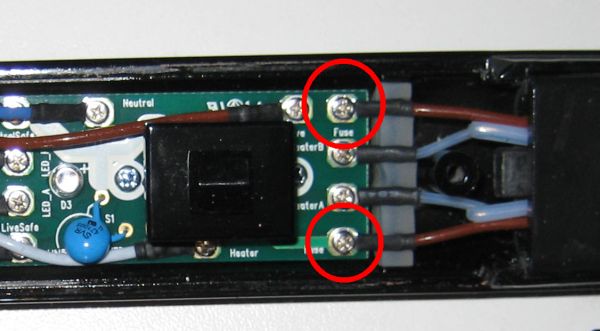
The thermal fuse is a component mounted on the back of the element (on all but the oldest models) on the switch side heater element. The mains power is routed through this component, so if it blows it will kill all power to the irons. The thermal fuse is different to the electrical fuse which you find inside the plug!
If you need to buy a thermal fuse for any model then see our online shop - GHD Thermal Fuse.
We've split this page into three sections and it is important you read the correct section based on the model of GHD irons you are trying to fix:
- GHD Gold S7N261 & Max S7N421
- Mk4 and Mk5 - 4.0, 4.1, 4.2 etc
- 3.1 and SS2
- GHD3, SS, MS and older
Here is a video on the subject of thermal fuses which covers the Mk3 and Mk4 and Mk5 models:
GHD Gold S7N261 & Max S7N421 models.
These new models are different to all the older models, each ceramic plate has its own thermal fuse, failure of the thermal fuse on either side will result in an error tone and the LEDs flashing red.
These models are tricky to work on and, although parts are available from our online shop, we would recommend using our GHD Gold & Max Repair Service.
Mk4 and Mk5 Models (4.0B, 4.1, 4.3, 4.2B, Mk5 Gold series, 5.0, MS5, SS5, SC5)
The thermal fuse will often fail on the recent models if something else, like the non switch side element, has failed. It will sometime fail for no obvious reason, but the irons may have been dropped or they may be arcing in the cable/socket area or inside the mains switch.
Therefore if you find a dead thermal fuse you should check out the heater elements. The normal cause is an issue with the non switch side heater element - either the thermistor has come detached from the element or the element is broken and is not heating. For more information please read the heaters page and the thermistor page.
Please check and clean the mains switch contacts on all Mk3, Mk4 type 2 and Mk5 irons. Including wide and narrow plate versions.
You can purchase a replacement thermal fuse for the Mk4 and Mk5 models via the shop.
3.1B and SS2
The thermal fuse is the most common cause of failure on the 3.1b model as GHD fitted a badly rated part. GHD used a thermal fuse that is rated to trip at 216 degrees celcius (part number SF214K). This might seem fine, as the temperature doesn't normally go above 200 degrees celcius, however this fuse suffers from "pellet shrinkage" more than the higher rated version during extended exposure to high temperatures. This means that gradually the internals of the fuse shrink and once they've shrunk below a threshold, the fuse fails prematurely. This causes the straighteners to completely die - no light, no heat, nothing.
Note however that thermal fuses can trip (like they are supposed to!) due to failures on the PCB (for example the triac going short) so always take care to check the operation of the GHD's after replacing the fuse.
For the particulary interested people reading this, then check out the "Thermal pellet Size (After High Temperature Holding)" section on page 13 & 14 of this technical datasheet and compare the SF214E and SF226E graphs - that should explain why the SF226E is better!
Testing the thermal fuse
The thermal fuse is the two brown wires coming out of the ceramic plate assembly on the switch side arm of the GHD's. If you put a multimeter across those two terminals (with them disconnected from the mains!), then it should be be close to zero ohms (maybe 1 ohm at worst). This means that when testing the thermal fuse you should see a similar output on your multimeter display as if you touched your meter's probes directly together. Don't get caught out by "OL" which means the thermal fuse is open circuit. If you've got an intermittent pair of GHD's, then you may want to try pulling / pushing on the wires slightly whilst measuring the resistance to see if it's the thermal fuse that is causing this. The thermal fuse can sometimes measure correctly but then fail under load after the power has been applied.

Replacing the Thermal Fuse
You can make your own thermal fuse with parts from Maplin/RS/Farnell, however now proper ones are available that are similar to the original part, we would recommend you just buy a pre made thermal from our shop. This will make sure it is electrically isolated from the plates and therefore safe.
There is a photographic guide to replacing the thermal fuse in a pair of 3.1B irons here.
Frequently Asked Questions
-
Can I simply bypass the thermal fuse?
Yes you could, but don't do it as it is not safe - with no safety cut out there is an increased risk of the irons starting a fire. -
How do I get the plastic cover off the heater plate?
It's difficult and the best way I have found is to slide it off the end of the heater. If you try to "flex" it off, the clips will break. See this guide for more info. -
Are there any dangers in doing this repair?
The thermal fuse has mains voltages going through it. Therefore whatever method you use, you need to make sure it is electrically isolated from the metal clip that holds it in place. Note the standard GHD thermal fuses come with a layer of Kapton tape just to make sure the thermal fuse does not touch the metal clip! -
Where can I buy a new thermal fuse from?
See the page about purchasing a thermal fuse -
What is / where can I buy Kapton Tape?
See the page about Kapton Tape
GHD3, SS, MS and older
The models prior to the 3.1B have the thermal fuse mounted on the back of the circuit board which means they never ever fail (as they are not attached to anything that gets hot!). Some versions do not even have the thermal fuse fitted, despite having terminals marked "fuse". Therefore if you have a pair of old irons with no thermal fuse this is normal and nothing to be worried about.
Short URL for this page: